2024 - UX/UI Design / Email Design

Saphirus Emails / QR
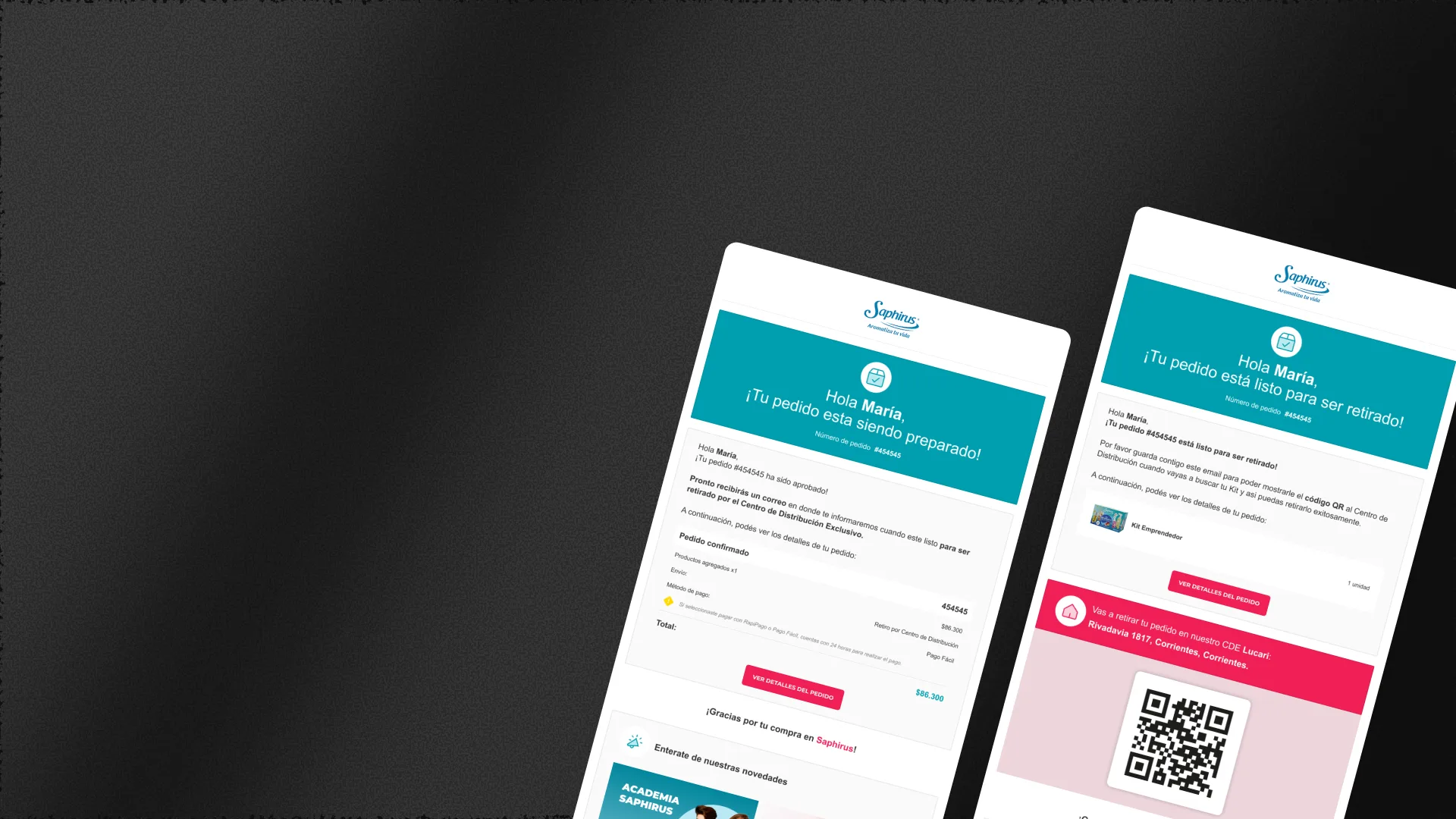
Email flow + QR for delivery of Saphirus reseller kits. Purchase, notification and delivery verification in a single flow.
— Role sheet
- Role
- UX/UI Designer
- Team
- Nadina Mazziteli (CCOI & PM), Daiana de la Vega (UX/UI), Matías Scovotti (PO), Álvaro Albornoz (Lead Dev)
- Duration
- 2 weeks + 2 months of follow-up
- Platform
- Web
- What I did
- Emails and communication, pain points and general usability
— Context
A delivery process that needed clarity
Saphirus needed a system that allowed its registered resellers to buy product kits through the online store and receive them at local points of sale throughout Argentina. The previous process caused confusion, oversights and communication problems between resellers, suppliers and the Saphirus team.
The challenge was to design a complete flow that kept the reseller informed at every step of the process, from purchase to delivery, and that allowed the local supplier to verify delivery in a simple and reliable way.
— Solution
Transactional emails + QR for delivery verification
A transactional email flow was designed to guide the reseller through each stage: purchase confirmation, order preparation and delivery with a QR code. Each email maintains Saphirus' visual identity and uses the brand's tone and voice.
The key to the system is the generation of a unique QR per purchase. When the kit arrives at the local supplier, the reseller presents the QR from their email and the supplier scans it to verify the purchase before delivering the kit. This system eliminates communication errors and ensures complete traceability.
— Features
Emails designed to keep resellers informed
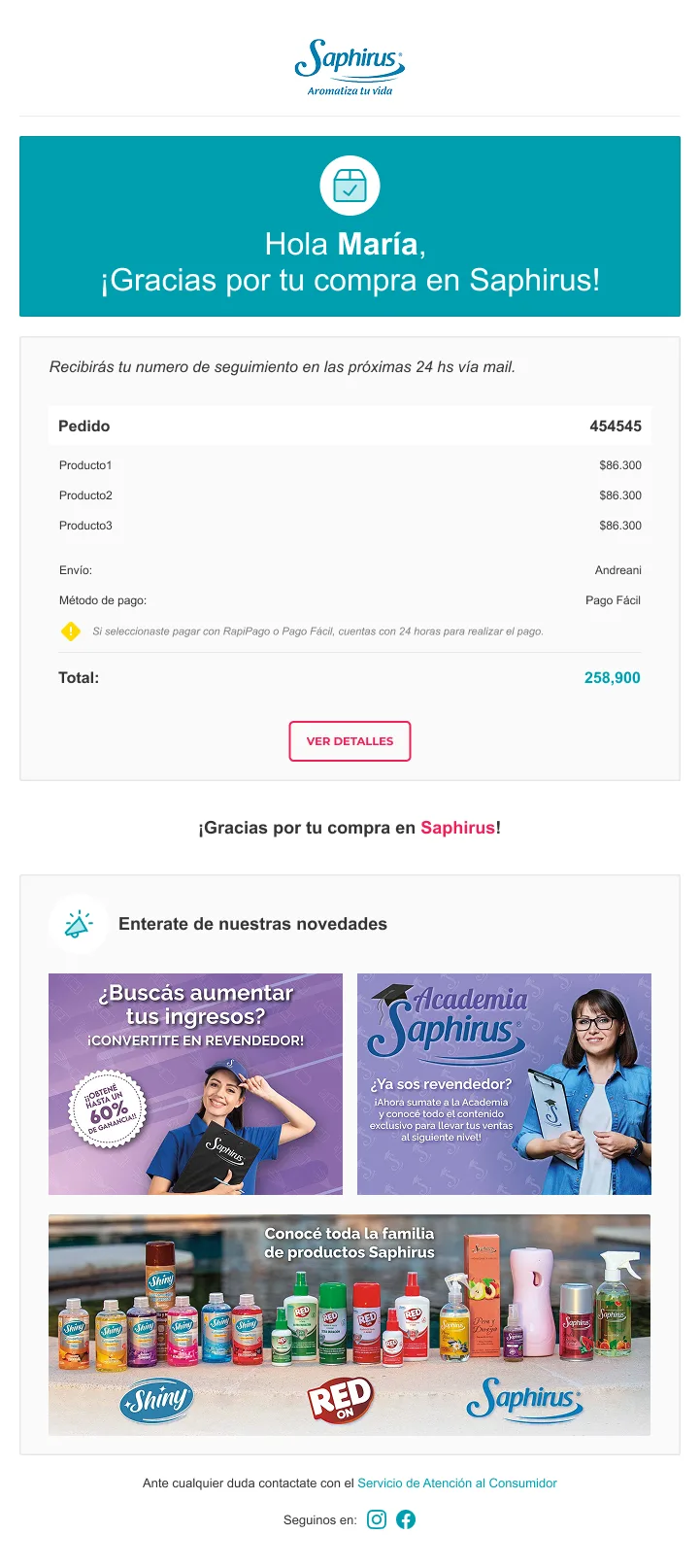
Purchase confirmationWelcome to the flow
Confirmation email that the reseller receives after completing the kit purchase. Summarizes the order, shows next steps and sets clear expectations about the delivery process.
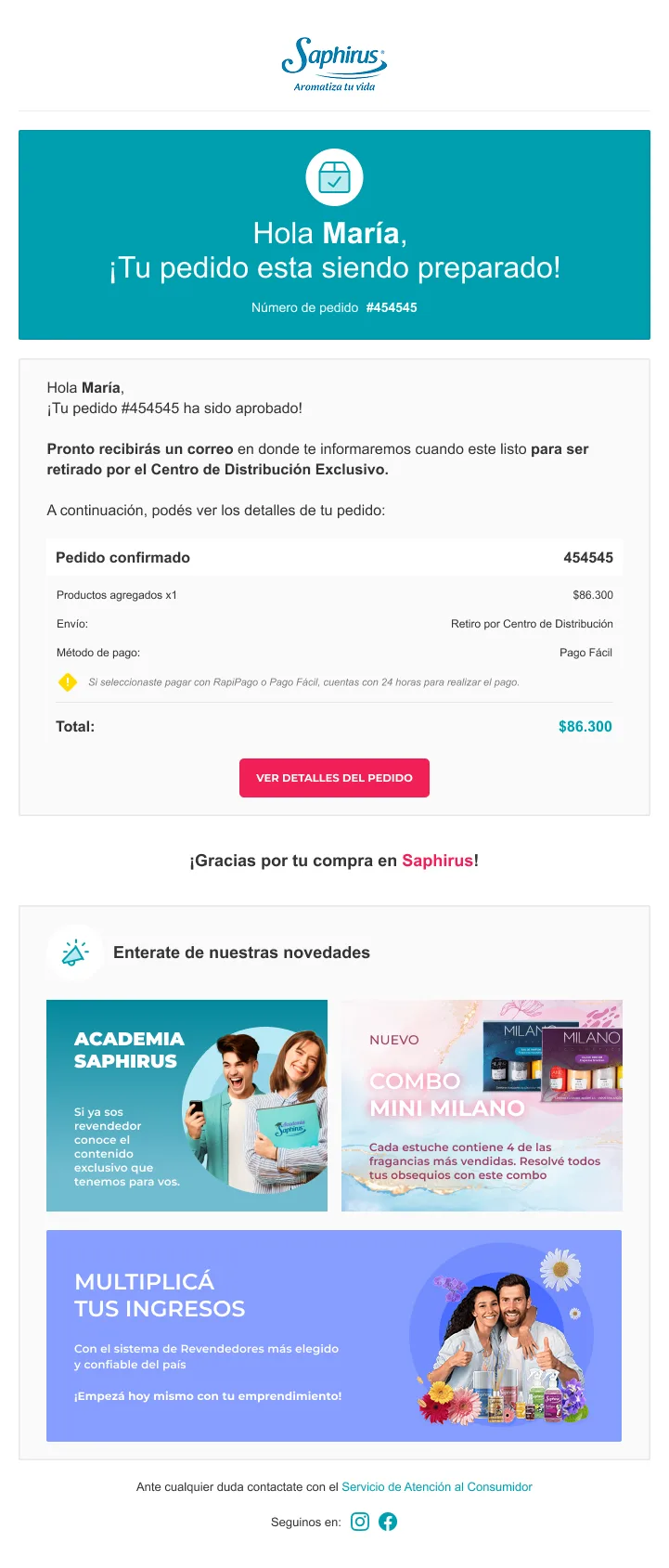
Order preparationStage-based notifications
Progress email that notifies the reseller when their order is being prepared. Maintains engagement and reduces user anxiety during the wait.
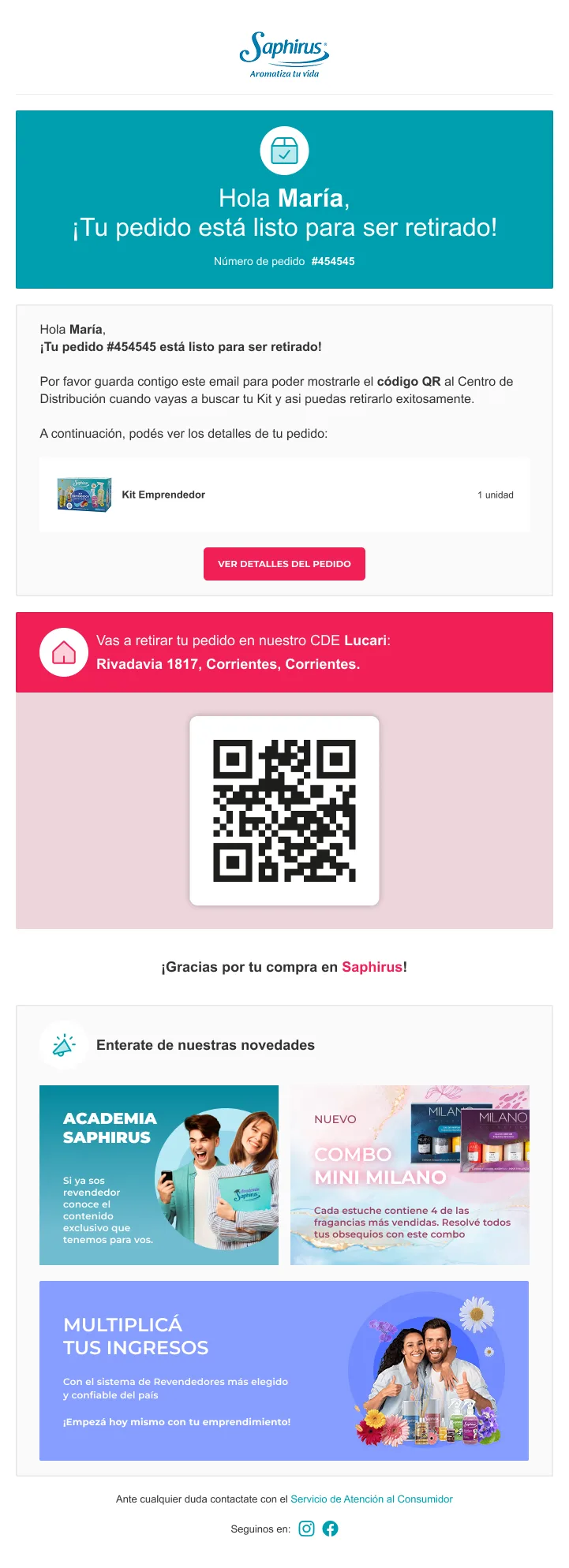
Delivery with QRUnique verification code
Email with the unique QR code generated for the purchase. The reseller presents it at the local point of sale for the supplier to scan and verify delivery. Includes clear instructions and kit data.
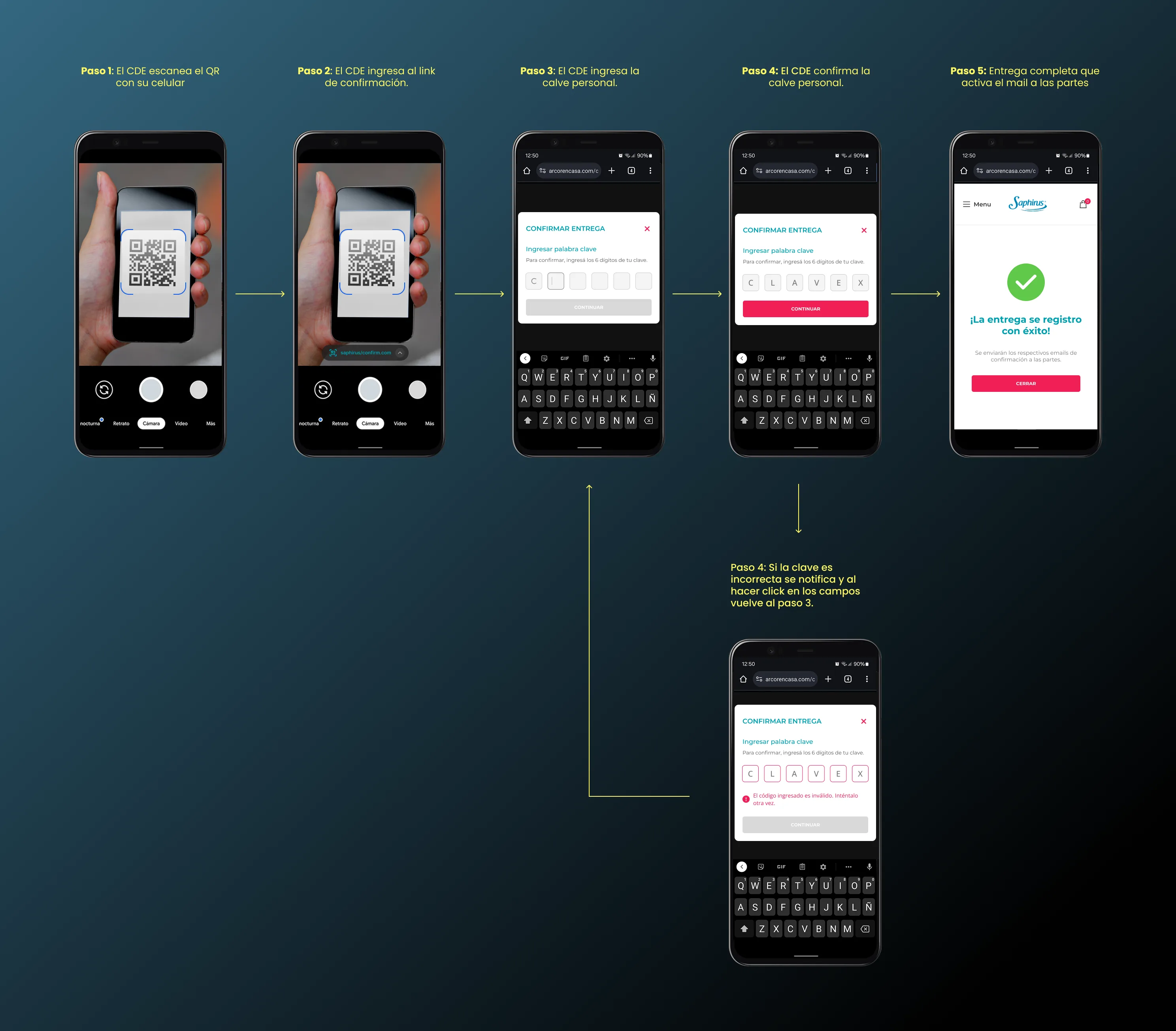
Mobile verificationScanned by the supplier
Mobile flow designed for the local supplier. When the QR is scanned, the system shows the full purchase details and lets the supplier confirm the kit delivery. Simple and fast interface for point-of-sale use.
— Tech stack
Design and research tools
All the email and verification flow design was done in Figma. I used GPT-4 to research technical points of the proposed flow and validate the QR system logic. For the visual banners I used Adobe Creative Suite (Photoshop and Illustrator).
— Results
Flow designed in weeks and monitored for months.
03
transactional emails designed with Saphirus visual identity
02
weeks of design, technical validation and adjustments with the team
02
months of post-launch follow-up to measure, iterate and polish the flow
— Key decisions
Decisions that shaped the project.
QR verification — instead of paper or manual codes
The problem
The local supplier had to confirm it was handing the right kit to the right person, in a simple and reliable way, in a process that was already generating confusion and communication problems.
The options
- —Paper signature or physical credential: the usual way for deliveries, but it gets lost, doesn't scale and leaves no digital traceability.
- —An alphanumeric code the supplier types in manually: no extra hardware, but slow and prone to typing errors.
- —A unique QR per purchase, scanned from the reseller's own email.
The decision
I chose the unique QR per purchase: it's a familiar metaphor (ticket code) that resellers and suppliers understand without explanation, it can't be reused and it ensures full traceability. I addressed the trade-off explicitly: I designed the manual alphanumeric-code fallback for when the QR won't scan, plus order number and support contact as backup.
Stage-based emails — instead of a single notification
The problem
The reseller had to be kept informed from purchase to delivery, in a process with waiting gaps that generated anxiety and uncertainty.
The options
- —A single confirmation email and nothing else until delivery: minimal effort, but the reseller is left in the dark during the wait.
- —A single email at the end saying the kit is ready: less noise, but order preparation becomes a black box.
- —One transactional email per stage: confirmation, preparation, ready for pickup with QR.
The decision
I chose three emails, one per state, because each answers a different user moment: confirm, support the wait, and enable pickup. The preparation email exists specifically to maintain engagement and reduce anxiety during the wait. What I sacrifice is simplicity: more pieces to design and keep consistent in identity, tone and structure.
App-less web verification — zero friction for the supplier
The problem
The verification flow is run by the local supplier at the point of sale, with the reseller waiting in front of them: it had to be simple and fast, with no access barriers.
The options
- —A dedicated app with login for the supplier: more control and session security, but installation, credentials and support for every point of sale in the country.
- —A web flow with mandatory login: in between, but still adds friction at the moment of delivery.
- —An open web flow from any mobile device, with no app and no login.
The decision
I chose the no-app, no-login option: the supplier can scan the QR with any mobile device and the flow is optimized for quick point-of-sale use. In return I give up session control and app-only features — I made up for it on security through the QR, which is unique, non-reusable, and shows the full order data before confirming.
— Next steps
Learn more about Saphirus Emails / QR
A transactional email flow with a unique QR per purchase that organizes communication between resellers, suppliers and the Saphirus team. Designed in Figma and refined with the technical team at each stage of the delivery process.